
Enterprise LLM Deployment Cost in India: Inference, Integration, Ops, and Governance
Most enterprise LLM budgets are wrong because they start with token pricing and stop there.
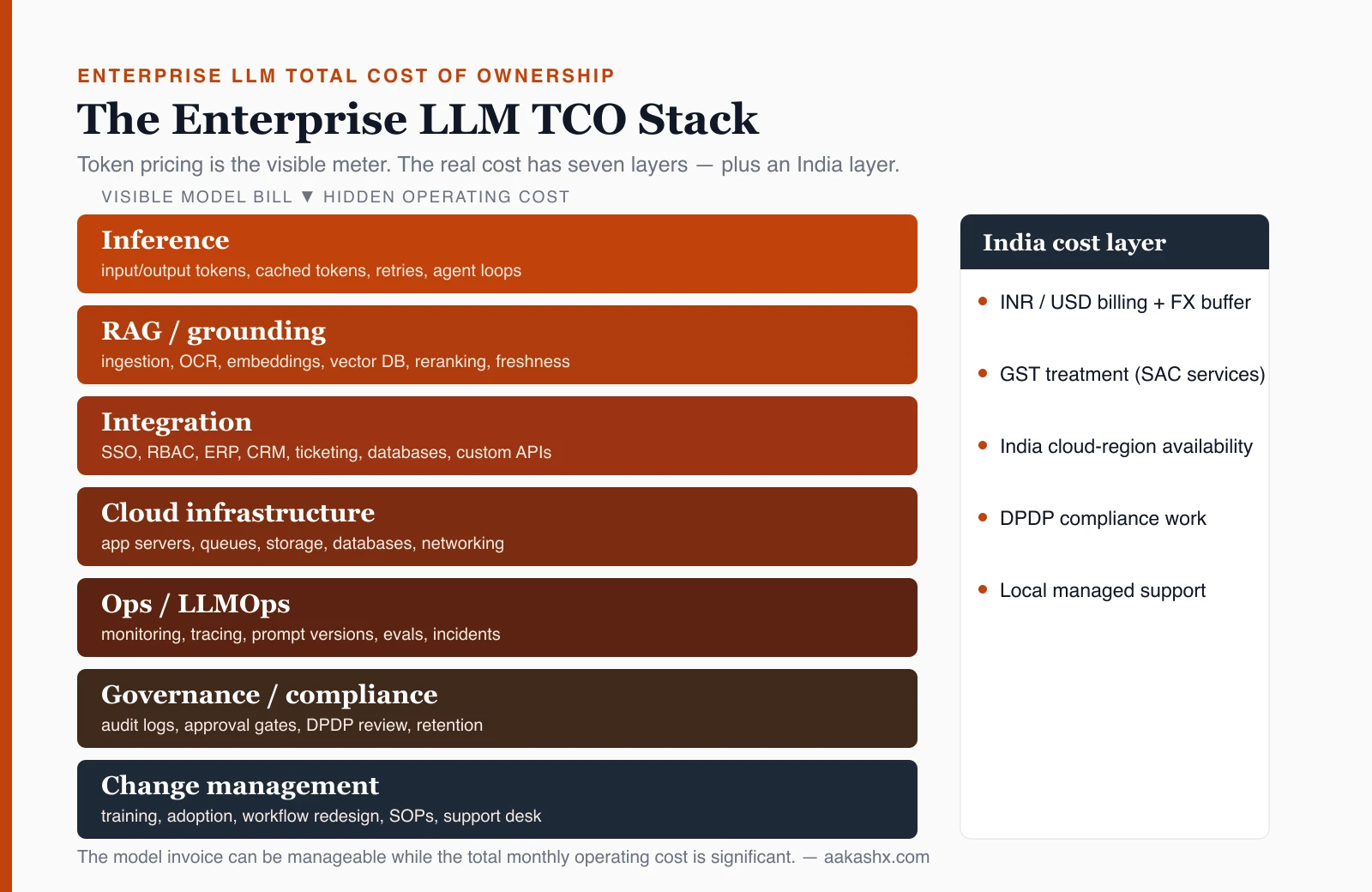
Token pricing matters. But the total cost of an enterprise LLM deployment also includes RAG, integrations, cloud infrastructure, observability, support, access control, audit logs, governance, compliance, GST treatment, FX exposure, and workflow change.
For Indian enterprises, the cost model has another layer: many AI APIs are priced in USD, budgets are approved in INR, cloud-region choices affect data handling and latency, GST treatment depends on contract structure, and DPDP compliance creates real implementation work.
The useful question is not "What does the model cost?" The useful question is: "What is the monthly operating cost of the LLM-enabled workflow after it is connected to real systems, real users, real data, and real governance?"
That is the cost model this article builds.
Table of Contents
- Why token pricing is not the real cost
- The enterprise LLM cost layers
- How to calculate LLM inference cost
- How RAG changes the cost model
- Why integration is often larger than the model bill
- India-specific cost factors
- How DPDP affects cost
- Build vs buy vs managed
- AWS Bedrock, Azure, and in-house deployment
- What usually gets underestimated
- Enterprise LLM cost calculator model
- Cost-control checklist
- What to pilot first
- FAQ
- Key takeaways
Why is token pricing not the real enterprise LLM cost?
Token pricing is only the visible meter.An enterprise LLM deployment becomes expensive when the model is connected to internal documents, databases, ERP systems, CRMs, support tools, identity providers, approval workflows, audit logs, monitoring systems, and production users.
A chatbot over a few uploaded PDFs can look cheap. A governed enterprise assistant that reads policy documents, respects user permissions, retrieves current data, drafts decisions, routes approvals, logs every action, and supports audits is a different cost structure.
The mistake is to estimate cost like this:
LLM cost = tokens used × model priceThat is incomplete. A better estimate is:
Enterprise LLM deployment cost =
  inference cost
+ RAG / grounding cost
+ integration cost
+ cloud infrastructure cost
+ LLMOps and support cost
+ governance and compliance cost
+ security and audit cost
+ change-management cost
+ GST / tax impact
+ FX buffer
+ contingency
Token cost is the invoice. Total cost is the operating model.
What are the cost layers in an enterprise LLM deployment?
A serious enterprise LLM cost model has seven layers.| Cost layer | What it includes | Why it matters |
|---|---|---|
| Inference | input tokens, output tokens, cached tokens, model calls, retries, agent loops | This is the visible model bill |
| RAG / grounding | ingestion, OCR, embeddings, vector DB, metadata, reranking, freshness sync | This makes answers reliable and current |
| Integration | SSO, ERP, CRM, ticketing, databases, APIs, workflow tools | This turns the LLM from demo into business system |
| Cloud infrastructure | app servers, queues, storage, databases, network, observability tools | This runs the production platform |
| Ops / LLMOps | monitoring, tracing, prompt versions, evaluation, incident handling, support | This keeps the system reliable |
| Governance / compliance | RBAC, audit logs, approval gates, DPDP review, data minimization, vendor review | This makes the system safe enough for enterprise use |
| Change management | training, adoption, workflow redesign, support desk, SOP updates | This makes the deployment actually used |
How do you calculate LLM inference cost?
LLM inference cost is the cost of running model calls. For text workloads, the basic formula is:Monthly inference cost =
(input tokens / 1M × input token price)
+ (cached input tokens / 1M × cached input price)
+ (output tokens / 1M × output token price)
+ tool-call costs
+ retry costs
+ evaluation costs
+ batch costsInput tokens include the user question, system instructions, conversation history, retrieved context, tool outputs, structured data, and any hidden prompt scaffolding.
Output tokens include the generated answer, reasoning traces if billed, tool-call arguments, summaries, drafts, and structured JSON outputs.
The real inference drivers
| Driver | Cost impact |
|---|---|
| Number of active users | Multiplies request volume |
| Requests per user per day | Creates recurring usage |
| Average input size | RAG context can increase this sharply |
| Average output size | Long reports cost more than short answers |
| Model choice | Premium models cost more than small/routed models |
| Cached input ratio | Reused context may reduce cost where supported |
| Retry rate | Failed calls and timeouts still cost money |
| Agent loops | Multi-step agents call models repeatedly |
| Tool calls | Some tools have separate pricing |
| Evaluation traffic | Test runs and quality checks consume tokens |
| Batch jobs | Async workloads may be cheaper on some platforms |
| Data residency / processing mode | May change pricing depending on provider |
Example scenario: calculating inference cost in INR
This is an example scenario, not a customer case study.
| Input | Value |
|---|---|
| Active users | 300 |
| Requests per user per working day | 8 |
| Working days per month | 20 |
| Monthly requests | 48,000 |
| Average input tokens per request | 5,000 |
| Average output tokens per request | 800 |
| Model | GPT-5.5 example pricing |
| FX assumption | ₹95 / USD working estimate |
| Retry/evaluation overhead | 15% |
Input tokens = 48,000 × 5,000 = 240,000,000 tokens
Output tokens = 48,000 × 800 = 38,400,000 tokens
Using example pricing of $5 / 1M input tokens and $30 / 1M output tokens:
Input cost = 240 × $5 = $1,200
Output cost = 38.4 × $30 = $1,152
Base inference cost = $2,352
With 15% retry/eval overhead = $2,704.80
Approx INR at ₹95/USD = ₹256,956 per month
This is only the model-call estimate. It does not include RAG, vector storage, OCR, cloud infra, integrations, support, governance, GST, or internal team cost. That is the point. The model invoice may be manageable while the total deployment cost is still significant.
How can model routing reduce inference cost?
Not every request needs the most capable model. A practical enterprise deployment usually routes work across model tiers. The architecture behind that routing, including gateways, registries, fallbacks and cascades, is covered in Model Strategy: Selection, Gateways, Routing and Fallbacks.
| Task type | Suggested model strategy |
|---|---|
| Classification | small/cheap model |
| Intent routing | small/cheap model |
| FAQ answer with good RAG context | small or mid-tier model |
| Drafting routine responses | small or mid-tier model |
| Complex legal/compliance synthesis | premium model |
| Code/debugging/system reasoning | premium model when justified |
| Long report generation | premium or mid-tier depending on risk |
| Batch summarization | cheaper batch mode if latency allows |
Use premium model only when:
- task risk is high,
- reasoning complexity is high,
- source conflict exists,
- answer requires synthesis across many documents,
- or workflow impact is material.
Do not route every prompt to the strongest model by default. For enterprise LLM cost control, model routing is often more important than prompt compression.
How does RAG change the cost model?
Retrieval-Augmented Generation, or RAG, is the pattern where the system retrieves external knowledge before generating an answer. RAG improves grounding, but it adds cost — and what actually breaks in production RAG is mostly retrieval quality, freshness, and access control, not the model.A production RAG system has two cost loops:
- The query-time loop: retrieve evidence and answer the user.
- The ingestion-time loop: continuously prepare the knowledge layer.
RAG cost includes:
| RAG component | Cost type |
|---|---|
| Document ingestion | compute, storage, queue workers |
| OCR / PDF parsing | extraction service cost |
| Table extraction | engineering + compute cost |
| Chunking | processing and quality tuning |
| Embeddings | model/API cost |
| Vector database | storage + compute |
| Metadata store | relational database cost |
| Full-text search | index/storage cost |
| Reranking | extra model cost and latency |
| Freshness sync | connector and processing cost |
| Permission-aware retrieval | engineering and governance cost |
| Citations | metadata and UI cost |
| Evaluation | human and automated QA cost |
Why RAG cost is easy to underestimate
RAG is not "upload documents once." Enterprise documents change. Policies are revised. Contracts are amended. Reports are regenerated. Support tickets are updated. Product catalogs change. User permissions change. SharePoint folders move. Old SOPs are superseded.
A production RAG system must know when the source changed, when it was ingested, when it was embedded, whether the source is current, whether permissions changed, whether a document was superseded, whether citations point to the latest version, and whether cached answers must be invalidated.
That creates ongoing cost.
Why is integration often larger than the model bill?
If the LLM does not connect to real systems, it remains a demo. If it connects to real systems, integration becomes the cost center.For enterprise deployment, integration usually includes Azure AD / Google Workspace / Okta SSO, role-based access control, ERP integration, CRM integration, ticketing integration, internal database integration, document repository connectors, workflow tools, email/calendar systems, approval systems, logging/monitoring tools, reporting dashboards, and custom APIs.
The model may cost a few lakhs per month in usage. The integration layer may require months of engineering, testing, security review, UAT, release management, and production support.
Integration cost depends on workflow depth
| Deployment type | Integration depth | Cost profile |
|---|---|---|
| Standalone chatbot | Low | Mostly inference + app hosting |
| Internal knowledge assistant | Medium | RAG + identity + document connectors |
| Support agent assistant | Medium/high | Ticketing + CRM + knowledge base + review workflow |
| Sales operations assistant | High | CRM + pricing + approvals + email + audit |
| Finance/ERP assistant | Very high | ERP + approvals + audit + compliance + strict access |
| Production operations agent | Critical | Tool permissions + rollback + strong human approval |
What India-specific costs should be included?
Indian enterprises need to model four India-specific cost realities.1. USD billing and INR budgeting
Many model APIs are priced in USD. Indian budgets are approved in INR. That means every cost model needs:
USD model cost × finance-approved USD/INR rate = INR model costUse your company's finance rate, not a static internet number. Also include FX buffer, card/payment gateway fees if applicable, enterprise billing terms, TDS/withholding treatment if applicable, and whether the vendor invoices from India or overseas. These are finance/accounting details, so validate with your CA or finance team.
2. GST treatment
Enterprise LLM projects usually combine several service categories: IT consulting and support, software design and development, hosting and infrastructure provisioning, infrastructure/network management, managed services, support, and possibly software subscription resale.
Do not treat GST as an afterthought. Add explicit budget lines:
Implementation services GST
Managed services GST
Cloud/vendor invoice tax treatment
Software subscription tax treatment
Input tax credit assumption
Export/import-of-service treatment if applicable
The exact rate and treatment depend on contract structure, place of supply, vendor location, and whether input tax credit is available. Validate this with finance/CA.
3. Cloud-region and data-processing choices
India-region deployment may matter for latency, customer comfort, regulated data, procurement, and data-handling posture. But not every model is available in every Indian region. Model support varies by provider, region, deployment type, and date.
Before estimating cost, check whether the selected model is available in the desired India region, whether provisioned throughput is available, whether data residency or regional processing changes price, whether fallback regions are acceptable, whether logs and embeddings stay in the expected location, and whether enterprise procurement accepts the selected cloud/provider.
Region choice is a cost decision, not only a compliance decision.
4. DPDP compliance work
The Digital Personal Data Protection Act, 2023 affects how Indian enterprises should think about LLM deployments involving personal data. A practical cost model should include work for purpose mapping, consent or lawful-use mapping, data minimization, access control, data processor/vendor review, deletion and correction workflows, grievance handling process, audit trail, breach/incident process, retention controls, and cross-border processing review.
This is not legal advice. The point is operational: DPDP creates product, engineering, legal, and governance work — much of it the same control surface covered in the enterprise AI agents governance playbook. That work should be in the budget.
How does DPDP affect enterprise LLM deployment cost?
DPDP affects cost when personal data enters the LLM workflow.| LLM use case | DPDP-related cost questions |
|---|---|
| HR assistant | Is employee personal data processed? Who can access it? |
| Customer support assistant | Are customer details sent to the model? Is consent/purpose covered? |
| Sales assistant | Does it process prospect/contact data? |
| Healthcare/insurance assistant | Is sensitive personal context involved? |
| Document summarizer | Do documents contain personal data? |
| RAG over customer records | Are deletion/correction rights reflected in the index? |
| Agentic workflow | Can the agent take action using personal data? |
DPDP cost checklist
Include cost for data classification, PII detection, prompt/data minimization, consent/purpose mapping, model-provider review, data processor agreements, access controls, audit logging, retention policy, deletion workflows, correction workflows, user-right request handling, incident process, and compliance review before rollout.
Build vs buy vs managed LLM deployment: what changes the cost?
There are three common deployment paths.| Path | What you pay for | Best when | Hidden risk |
|---|---|---|---|
| Build in-house | Engineering team, infra, APIs, governance, support | You have strong platform team and long-term strategic need | Underestimating ops/governance |
| Buy SaaS | Subscription/license, vendor configuration, integrations | Use case matches product closely | Limited customization or data/control constraints |
| Managed deployment | Implementation + monthly managed operations | You need custom workflow but do not want full internal ownership immediately | Vendor dependency; scope must be governed |
Build in-house
Build in-house when AI is strategic infrastructure, workflows are highly custom, data boundaries are complex, long-term control matters, and you have a capable platform/security team. Budget for product owner, architect, backend/platform engineers, data engineer, security engineer, QA, DevOps/SRE, compliance review, support, and ongoing model/vendor changes.
Buy SaaS
Buy SaaS when the workflow is standard, the vendor already supports your systems, governance needs are manageable, rollout speed matters, and deep customization is not required. Budget for license/subscription, implementation, SSO, connector setup, user training, admin time, vendor support, contract review, and data-processing review.
Managed deployment
Managed deployment works when the use case is custom, the internal team is stretched, governance still matters, and the enterprise wants operational ownership without building everything from scratch. Budget for discovery, implementation, cloud/model cost, integrations, monthly support, SLA, monitoring, reporting, change requests, and governance reviews.
This is often the practical middle path for Indian enterprises that want production outcomes without immediately creating a full internal AI platform team.
How do AWS, Azure, managed APIs, and in-house LLM deployment change the cost?
The deployment model changes the cost structure more than many teams expect. A team using OpenAI directly, AWS Bedrock, Azure OpenAI, Azure Foundry, a self-hosted open model, or an on-prem GPU cluster may be solving the same business problem, but the cost model is different in each case.The decision is not only technical. It affects procurement, billing currency, data boundary, compliance review, support model, latency, capacity planning, engineering effort, and long-term operating risk.
There are five common deployment models:
| Deployment model | What you are buying | Main cost pattern |
|---|---|---|
| Direct managed API | Model access from provider API | Token-based usage plus application/integration cost |
| AWS Bedrock managed deployment | Access to multiple foundation models through AWS governance and services | Token pricing, provisioned throughput, Bedrock services, AWS infra, AWS support |
| Azure OpenAI / Azure Foundry deployment | OpenAI and other models inside Azure ecosystem | Token pricing or PTUs, Azure AI Search, Azure infra, Azure governance, Microsoft enterprise terms |
| Managed open-model compute | Open-source/custom model on managed GPU infrastructure | GPU compute hours plus model serving, storage, and ops |
| In-house / self-hosted LLM | You operate model infrastructure yourself | GPU CAPEX/OPEX, platform engineering, MLOps, security, monitoring, support, utilization risk |
For this workload, which deployment model gives the best balance of cost, control, latency, compliance, reliability, and operational ownership?What does AWS Bedrock add to the LLM cost model?
AWS Bedrock is a managed foundation-model platform inside AWS. It can reduce the burden of directly managing model infrastructure, but it does not remove the rest of the enterprise cost model. A Bedrock deployment can include these cost buckets:
| Cost bucket | What to include |
|---|---|
| Model invocation | Input/output token usage by model/provider/region/tier |
| Batch inference | Lower-cost async jobs where latency can wait |
| Provisioned Throughput | Hourly committed model capacity for predictable throughput |
| Bedrock Knowledge Bases | RAG setup, ingestion, retrieval, embeddings, vector store dependency |
| Data Automation | Document/image/video/audio parsing for RAG or document intelligence |
| Reranking | Per-query rerank model cost where used |
| Guardrails | Content filters, denied topics, sensitive-data filters, grounding checks, reasoning checks |
| Model Evaluation | Judge-model tokens, human evaluation tasks, evaluation runs |
| Prompt optimization/routing | Prompt optimization calls or intelligent prompt routing where used |
| AWS infrastructure | Lambda/ECS/EKS, API Gateway, S3, databases, OpenSearch/Aurora, VPC, NAT, CloudWatch |
| Security/governance | IAM, KMS, Secrets Manager, CloudTrail, private networking, audit logs |
| Support | AWS support plan or enterprise support if required |
Monthly AWS Bedrock LLM cost =
  Bedrock model invocation cost
+ Bedrock batch inference cost
+ provisioned throughput cost
+ Knowledge Bases / RAG cost
+ embedding cost
+ reranking cost
+ Data Automation cost
+ Guardrails cost
+ Model Evaluation cost
+ prompt routing / optimization cost
+ AWS application infrastructure cost
+ AWS security / logging / monitoring cost
+ AWS support cost
+ implementation and operations team cost
On-demand is usage-driven. It works when traffic is variable, uncertain, or still being validated. Provisioned throughput is capacity-driven. It can make sense when the workload is production-critical, steady, latency-sensitive, or likely to hit throughput limits.
| Mode | Cost advantage | Cost risk |
|---|---|---|
| On-demand | No fixed capacity commitment | Cost spikes with usage, retries, long context, agent loops |
| Batch | Lower cost for async work | Not suitable for real-time workflows |
| Provisioned throughput | Predictable capacity and latency planning | You pay for allocated capacity even if utilization is low |
| Reserved / committed capacity | Lower effective cost for steady workloads | Wrong sizing creates waste or throttling |
Guardrails are not only design work. Some managed guardrail checks are metered, so include cost for content filtering, denied-topic filtering, sensitive-information filtering, contextual grounding checks, automated reasoning checks, policy evaluation, human review for escalated cases, and logging/audit evidence. The hidden mistake is assuming safety is a one-time engineering cost. In a high-volume application, runtime guardrail checks can become a recurring usage cost.
AWS Bedrock usually makes sense when the enterprise is already standardized on AWS, IAM/KMS/VPC/CloudTrail governance matters, multiple model providers need to be evaluated, RAG and document workflows should stay inside AWS, procurement prefers AWS billing, and the team wants managed model access rather than running GPU infrastructure. It can become expensive when every request uses a premium model, RAG context is large, reranking is applied too broadly, guardrails run on high-volume long text, provisioned throughput is underutilized, agent workflows create repeated model/tool calls, and logs are retained without lifecycle rules.
What does Azure OpenAI or Azure Foundry add to the LLM cost model?
Azure OpenAI and Azure Foundry are often attractive to enterprises already using Microsoft cloud, Entra ID, Microsoft 365, Fabric, Purview, Defender, Cosmos DB, or Azure AI Search. The cost model is broader than token pricing.
| Cost bucket | What to include |
|---|---|
| Azure OpenAI / model tokens | Input, output, cached input, model-specific pricing |
| Provisioned Throughput Units | Hourly PTU allocation for predictable capacity |
| Batch API | Lower-cost async processing where latency can wait |
| Azure AI Search | Search units or serverless consumption, indexes, vector search, semantic ranker, agentic retrieval |
| Azure Storage | Raw files, extracted text, logs, artifacts |
| Azure databases | Cosmos DB, Azure SQL, PostgreSQL, metadata stores |
| Azure compute | App Service, Functions, Container Apps, AKS, VMs |
| Azure networking | Private endpoints, VNet integration, NAT, bandwidth |
| Azure security | Key Vault, Managed Identity, Defender, Entra ID, RBAC |
| Azure observability | Azure Monitor, Log Analytics, Application Insights |
| Governance | Purview, audit logs, access review, retention policies |
| Support | Microsoft support plan, partner support, managed operations |
Monthly Azure LLM deployment cost =
  Azure OpenAI / Foundry model usage
+ PTU capacity cost if used
+ Batch API jobs
+ Azure AI Search cost
+ embedding and RAG indexing cost
+ storage and database cost
+ app/container/serverless compute cost
+ networking and private access cost
+ monitoring/logging cost
+ Key Vault / security / governance cost
+ Microsoft support / partner support
+ implementation and operations team cost
With token billing, cost follows usage. With PTUs, cost follows allocated capacity. This helps with predictability but creates utilization risk. The CTO/CFO question should be: will this deployment use enough of the allocated PTU capacity to justify the commitment? If utilization is low, on-demand may be cheaper. If throughput is steady and latency-sensitive, PTU may be justified.
For RAG-heavy deployments, Azure AI Search becomes a major line item. Include service tier, replicas, partitions, search units, serverless compute units if using serverless, indexed storage, vector index size, semantic ranker, agentic retrieval, AI enrichment, indexing frequency, document cracking/extraction, private networking, monitoring, and backup/rebuild strategy. Azure AI Search cost is not just "search." It is the retrieval backbone for the LLM system.
Azure usually makes sense when enterprise identity is already on Microsoft Entra ID, documents live in Microsoft 365, SharePoint, OneDrive, Teams, or Fabric, procurement prefers Microsoft agreements, security teams already use Defender/Purview, Azure AI Search is a natural RAG layer, and private networking and regional deployment matter. It can become expensive when PTUs are bought before workload sizing is clear, Azure AI Search is over-provisioned, semantic ranker or agentic retrieval is applied to all queries, logs are retained at high volume without lifecycle policy, and multiple Azure services are added before the workflow is validated.
What is the cost of managed open-model deployment?
Managed open-model deployment sits between API usage and full self-hosting. In this model, the enterprise uses open-source or custom models but does not fully operate the GPU infrastructure. Examples include managed compute offerings on cloud platforms where the provider handles the underlying GPU capacity, scaling surface, and some serving abstraction.
You may not pay per token in the same way. You may pay for GPU compute hours, managed endpoint uptime, autoscaling capacity, storage, networking, model artifacts, logs, monitoring, and support.
Monthly managed open-model cost =
  GPU compute hours
+ endpoint uptime cost
+ autoscaling buffer
+ model artifact storage
+ container/image storage
+ request routing / load balancing
+ monitoring and logs
+ networking and egress
+ security controls
+ managed platform fee
+ engineering and MLOps cost
Use this path when open-source model control matters, data boundary matters, per-token API economics are unattractive at high volume, latency tuning is important, the model can be quantized or optimized, and the team wants more control without building full GPU operations. But it is not automatically cheaper. It becomes cheaper only when utilization is high, model size is appropriate, batching is effective, the workload is predictable, and serving is optimized. If the endpoint is idle most of the day, token-based APIs may be cheaper.
What is the cost of in-house or self-hosted LLM deployment?
Going in-house is as much a strategy decision as a cost one — see LLMs Aren't Magic: what CXOs must know before going in-house. "In-house LLM" can mean two different things. It can mean cloud self-hosting, where the enterprise runs open-weight models on GPU instances in AWS, Azure, GCP, or another cloud. Or it can mean true on-prem deployment, where the enterprise buys or leases GPU servers and operates them in its own data center or colocation facility. These are different cost models.
| Model | Description | Cost profile |
|---|---|---|
| Cloud self-hosted | You run models on cloud GPU instances | GPU hourly cost + cloud infra + MLOps |
| On-prem self-hosted | You buy/lease GPU servers | CAPEX amortization + power/cooling + platform team |
| Hybrid | Sensitive workloads on self-hosted, general workloads on API | More architecture complexity but better cost/control balance |
Monthly cloud self-hosted LLM cost =
  GPU_instance_hourly_rate × running_hours × number_of_instances
+ storage_cost
+ network_cost
+ load_balancer_cost
+ container_or_VM_platform_cost
+ monitoring_and_logging_cost
+ security_tooling_cost
+ engineering_team_cost
+ support_cost
+ contingency
On-prem or private data-center LLM hosting adds different costs: GPU servers, amortization, spare capacity, networking, storage, power, cooling, rack/colo, hardware support, platform software, MLOps, security/compliance, an operations team, and a refresh cycle.
Monthly on-prem LLM cost =
  GPU_server_CAPEX / amortization_months
+ network_CAPEX / amortization_months
+ storage_CAPEX / amortization_months
+ rack_or_colocation_cost
+ power_cost
+ cooling_cost
+ hardware_support_cost
+ platform_software_cost
+ monitoring_security_cost
+ operations_team_cost
+ spare_capacity_cost
+ disaster_recovery_cost
To compare self-hosting with API pricing, calculate effective cost per million tokens served:
Effective self-hosted cost per 1M tokens =
monthly_self_hosted_platform_cost / monthly_successful_tokens_served_in_millions
This number is only meaningful after measuring actual throughput. A GPU cluster that is 80% utilized can look attractive. A GPU cluster that is 10% utilized can be more expensive than managed APIs.
Self-hosting usually fails financially when teams ignore utilization. GPU cost is mostly fixed once capacity is running. Token API cost scales with usage.
| Workload pattern | Usually better fit |
|---|---|
| Low volume, uncertain usage | Managed API |
| Bursty workload | Managed API or serverless-style managed model |
| Steady high-volume workload | Provisioned throughput or self-hosting |
| Strict data boundary | Azure/AWS private deployment or self-hosting |
| Specialized open model | Managed open-model compute or self-hosting |
| Deep latency optimization | Self-hosting or provisioned capacity |
| Small team, fast pilot | Managed API |
How should Indian enterprises compare OpenAI direct, AWS Bedrock, Azure, and in-house deployment?
| Criterion | OpenAI direct/API | AWS Bedrock | Azure OpenAI/Foundry | Cloud self-hosted | On-prem/self-hosted |
|---|---|---|---|---|---|
| Fastest pilot | Strong | Strong | Strong | Moderate | Weak |
| Enterprise cloud governance | Moderate | Strong for AWS shops | Strong for Microsoft shops | Strong but you own more | Strong but heavy |
| Model variety | Strong for OpenAI models | Strong across providers | Strong across Azure-supported models | Depends on chosen models | Depends on chosen models |
| Data boundary control | Depends on contract/settings | Stronger inside AWS controls | Stronger inside Azure controls | Strong | Highest if implemented well |
| Cost predictability | Usage-based | Usage/provisioned options | Usage/PTU options | Capacity-based | Capacity/CAPEX-based |
| Low-volume economics | Strong | Strong | Strong | Weak/moderate | Weak |
| High-volume economics | Can become expensive | Provisioning may help | PTUs may help | Can be strong if utilized | Can be strong if utilized |
| Integration with enterprise apps | Custom | AWS ecosystem | Microsoft ecosystem | Custom | Custom |
| RAG support | Custom | Bedrock Knowledge Bases + AWS services | Azure AI Search + Foundry | Custom | Custom |
| Ops burden | Low | Medium | Medium | High | Very high |
| Governance burden | Shared | Shared with AWS controls | Shared with Azure controls | Mostly yours | Yours |
| Best fit | Quick productized use cases | AWS-standard enterprises | Microsoft-standard enterprises | high-volume/custom-control teams | strict control/high stable usage |
What usually gets underestimated?
- Context size. Teams estimate using user-question tokens and forget retrieved context, system prompts, tool outputs, conversation history, and structured JSON.
- Output length. Reports, summaries, emails, and compliance explanations can be output-heavy. Output tokens are often more expensive than input tokens.
- Agent loops. An agentic workflow may call the model multiple times for one user task: classify → retrieve → plan → call tool → interpret result → draft → check policy → revise → final answer. One user request can become many model calls.
- Failed calls and retries. Timeouts, malformed JSON, tool failures, rate limits, and validation errors create retry cost.
- Evaluation traffic. Production systems need test suites. Evals consume tokens, compute, and human review time.
- RAG freshness. Keeping the knowledge base current costs more than creating the first index.
- Access control. Permission-aware retrieval and action control require real engineering. Prompt instructions are not enough.
- Governance software. Governance becomes software: approval flows, audit logs, access policies, retention rules, deletion workflows, and evidence exports.
- Human review. Human-in-the-loop is not free. If workflows require approvals, someone owns those queues.
- Change management. If users do not trust or adopt the system, the model cost becomes irrelevant.
- Abandoned pilot infrastructure. AI pilots leave debris. GPU instances stopped but never terminated, unattached volumes, orphaned snapshots, an idle vector store, a load balancer from a proof of concept that ended two quarters ago. That spend keeps landing on the AI cost centre and inflates the apparent cost of the deployment. A periodic read-only sweep such as Cloud Cost Sentinel, a scanner I built at TomorrowCentral, returns a ranked list of removable AWS resources with the evidence behind each one, which is the cheapest correction available: you stop paying for pilots you already shut down.
Enterprise LLM cost calculator model
Use this as a spreadsheet structure.Input assumptions
| Input | Example variable |
|---|---|
| Active users | active_users |
| Requests per user per day | requests_per_user_day |
| Working days per month | working_days |
| Average input tokens | avg_input_tokens |
| Average RAG context tokens | avg_rag_tokens |
| Average output tokens | avg_output_tokens |
| Cached input percentage | cached_input_pct |
| Premium model percentage | premium_model_pct |
| Small model percentage | small_model_pct |
| Retry rate | retry_rate |
| Evaluation traffic multiplier | eval_multiplier |
| USD/INR rate | fx_rate |
| GST/tax assumption | gst_assumption |
| One-time build cost | one_time_build_cost |
| Amortization period | amortization_months |
| Monthly ops cost | ops_cost_monthly |
| Monthly governance cost | governance_cost_monthly |
| Monthly support cost | support_cost_monthly |
| Monthly cloud infra cost | infra_cost_monthly |
| Contingency percentage | contingency_pct |
Core formulas
monthly_requests =
active_users × requests_per_user_day × working_days

monthly_input_tokens =
monthly_requests × (avg_input_tokens + avg_rag_tokens)

monthly_output_tokens =
monthly_requests × avg_output_tokens

uncached_input_tokens = monthly_input_tokens × (1 - cached_input_pct)
cached_input_tokens   = monthly_input_tokens × cached_input_pct

monthly_inference_usd =
(uncached_input_tokens / 1M × input_price)
+ (cached_input_tokens / 1M × cached_input_price)
+ (monthly_output_tokens / 1M × output_price)

adjusted_inference_usd =
monthly_inference_usd × (1 + retry_rate + eval_multiplier)

adjusted_inference_inr = adjusted_inference_usd × fx_rate

monthly_amortized_build_cost = one_time_build_cost / amortization_months

monthly_total_before_tax =
adjusted_inference_inr
+ rag_cost_monthly
+ infra_cost_monthly
+ monthly_amortized_build_cost
+ ops_cost_monthly
+ governance_cost_monthly
+ support_cost_monthly

monthly_total_estimate =
monthly_total_before_tax
+ tax_or_gst_impact
+ fx_buffer
+ contingency
This model is more useful than a generic price range because every enterprise can plug in its own users, request volume, model mix, integration effort, and governance burden.
Deployment-model inputs
To compare deployment modes, add these inputs.
| Input | Variable |
|---|---|
| Deployment model | deployment_model |
| Model provider | model_provider |
| Cloud provider | cloud_provider |
| Region | region |
| On-demand token price | token_price_input, token_price_output |
| Cached token price | cached_token_price |
| Batch discount | batch_discount_pct |
| Provisioned capacity units | provisioned_units |
| Provisioned unit hourly cost | provisioned_unit_hourly_cost |
| Provisioned utilization | provisioned_utilization_pct |
| GPU hourly cost | gpu_hourly_cost |
| Number of GPUs | gpu_count |
| GPU running hours | gpu_running_hours |
| Hardware CAPEX | hardware_capex |
| Amortization period | hardware_amortization_months |
| Power and cooling | power_cooling_monthly |
| Managed platform services | managed_services_monthly |
| Cloud support plan | cloud_support_monthly |
| MLOps team cost | mlops_team_monthly |
Per-deployment-model cost formulas
monthly_managed_api_cost =
  input_token_cost
+ cached_input_token_cost
+ output_token_cost
+ batch_job_cost
+ retry_cost
+ eval_cost

monthly_managed_cloud_cost =
  model_usage_or_PTU_cost
+ RAG_service_cost
+ search_or_vector_store_cost
+ embedding_cost
+ guardrail_or_safety_service_cost
+ evaluation_cost
+ app_compute_cost
+ storage_cost
+ database_cost
+ networking_cost
+ monitoring_logging_cost
+ security_governance_cost
+ support_plan_cost
+ implementation_ops_cost

monthly_cloud_self_hosted_cost =
  gpu_hourly_cost × gpu_count × gpu_running_hours
+ storage_cost
+ network_cost
+ serving_platform_cost
+ monitoring_logging_cost
+ security_cost
+ MLOps_team_cost
+ support_cost
+ contingency

monthly_onprem_self_hosted_cost =
  hardware_capex / hardware_amortization_months
+ network_capex / amortization_months
+ storage_capex / amortization_months
+ power_cooling_monthly
+ rack_or_colocation_monthly
+ hardware_support_monthly
+ platform_software_monthly
+ monitoring_security_monthly
+ MLOps_team_monthly
+ disaster_recovery_monthly
+ contingency
To compare across models, normalize to effective cost per million tokens:
effective_cost_per_1M_tokens =
monthly_total_cost / monthly_successful_tokens_served_in_millions
Do not compare list prices only. Compare effective cost after utilization, retries, support, engineering, and governance.
What should a CTO ask before approving an enterprise LLM budget?
Usage: How many active users? How many requests per user per day? What percentage of requests require premium models? How much context is retrieved per request? What output length is expected? What retry rate are we assuming?
Architecture: Is the system standalone, RAG-based, or agentic? Which internal systems does it connect to? Are integrations read-only or write-capable? Does it need real-time data or synced data? What is the fallback when the model/API is unavailable?
Security and compliance: Does personal data enter prompts or retrieved context? Is DPDP review required? Are deletion/correction workflows reflected in RAG indexes? Are logs storing sensitive data? Are access controls enforced before retrieval and tool use? Are audit logs available?
Operations: Who owns monitoring? Who reviews failures? Who manages prompts and model changes? Who handles user support? What is the SLA? How will cost be monitored by team/workflow/customer?
Finance: Is model billing in USD? What FX rate is used? Is GST applicable? Is input tax credit available? Are cloud and API costs billed through an Indian entity or an overseas vendor? Is there a contingency buffer?
Cost-control checklist for CTOs and CFOs
Inference control
- Use model routing instead of one premium model for all tasks.
- Use smaller models for classification, routing, extraction, and simple drafting.
- Limit retrieved context size.
- Cache repeated system prompts and common context where supported.
- Use batch processing for non-urgent jobs where available.
- Set token budgets per workflow.
- Track cost per user, team, and workflow.
- Alert on abnormal usage spikes.
RAG control
- Separate ingestion cost from query cost.
- Track embedding cost by source.
- Avoid re-embedding unchanged documents.
- Store content hashes.
- Track source freshness.
- Deduplicate documents and chunks.
- Evaluate retrieval quality before increasing top-k.
- Do not use premium generation to compensate for poor retrieval.
Integration control
- Start with read-only use cases.
- Limit first rollout to 1–2 systems.
- Avoid write actions until audit and approval gates exist.
- Reuse connector patterns.
- Define ownership for each integration.
- Budget maintenance for API changes.
Governance control
- Map personal data flows.
- Define what data may enter prompts.
- Enforce RBAC before retrieval.
- Add approval gates for high-risk actions.
- Log prompts, retrieved context, tool calls, approvals, and outputs where appropriate.
- Define data retention rules.
- Define deletion/correction workflows.
- Review vendor/data processor terms.
Operational control
- Build cost dashboards before broad rollout.
- Define failure queues.
- Track latency by stage.
- Version prompts and retrieval logic.
- Maintain evaluation sets.
- Assign support ownership.
- Run monthly cost and quality review.
Deployment-model control
- Managed API / OpenAI direct: route simple tasks to cheaper models; use cached inputs and batch mode; set per-user and per-workflow token budgets; monitor retry and agent-loop cost; review USD/INR impact monthly; validate data-processing terms.
- AWS Bedrock: compare on-demand vs provisioned throughput using measured traffic; track Knowledge Bases, Data Automation, Guardrails, reranking, and model evaluation cost separately; use batch inference for async jobs; watch CloudWatch/log retention and VPC/NAT costs.
- Azure OpenAI / Foundry: compare on-demand vs PTU after measuring traffic; track Azure AI Search, semantic ranker, agentic retrieval, and AI enrichment separately; use Batch API for non-urgent workloads; avoid over-provisioning Search replicas/partitions; validate region/model availability before committing architecture.
- Cloud self-hosted: measure GPU utilization continuously; use batching and quantization where quality allows; right-size model to task; track cost per 1M successful tokens; keep a fallback managed API; define SRE ownership before production.
- On-prem self-hosted: amortize hardware realistically; include spare capacity, power, cooling, rack, and hardware support; include GPU platform engineering, physical/network security, and disaster recovery; compare against managed API using actual utilization, not theoretical peak throughput.
What should be piloted first?
The first pilot should not be the flashiest use case. It should be a workflow where data is available, permissions are understandable, output can be reviewed, business value is visible, risk is limited, and integration depth is manageable.| Pilot | Why it works |
|---|---|
| Internal policy Q&A | Read-only, useful, low action risk |
| Support response drafting | Human can review before send |
| Sales account briefing | Combines CRM + notes + documents |
| Report summarization | Clear time saving, low write risk |
| Technical knowledge assistant | Good RAG test bed |
| Compliance evidence finder | Useful if citations and source versions are strong |
Frequently Asked Questions About Enterprise LLM Deployment Cost
What is enterprise LLM deployment cost?
Enterprise LLM deployment cost is the total cost of running an LLM-enabled workflow in production. It includes model inference, RAG, integrations, cloud infrastructure, monitoring, support, governance, compliance, security, and change management.
Is inference usually the biggest cost?
Not always. Inference is the most visible cost, but integration, RAG, security, governance, and operations can exceed the model bill when the system connects to real enterprise workflows.
How do you calculate LLM inference cost?
Calculate monthly request volume, average input tokens, average output tokens, cached input ratio, retry rate, evaluation traffic, and model pricing. Then convert USD-denominated model cost into INR using your finance-approved FX rate.
Why does RAG increase cost?
RAG adds ingestion, OCR, chunking, embeddings, vector storage, metadata storage, reranking, source freshness, permission-aware retrieval, and evaluation. It improves reliability, but it is not free.
What India-specific costs should be included?
Indian enterprises should include INR/USD conversion, FX buffer, GST/tax treatment, India cloud-region availability, DPDP compliance work, vendor/data processor review, and local support/managed-service cost.
How does DPDP affect LLM cost?
DPDP can add cost when personal data is processed by the LLM workflow. Teams may need consent or purpose mapping, data minimization, access control, deletion/correction workflows, audit logs, retention rules, and vendor review.
How do AWS Bedrock, Azure OpenAI, and self-hosting differ in cost?
Managed APIs and managed clouds price mostly by usage, with provisioned-capacity options (Bedrock provisioned throughput, Azure PTUs) for steady workloads. Managed clouds also add RAG/search, guardrails, logging, networking, and support line items. Self-hosting shifts cost into GPU capacity and platform engineering, and only becomes attractive when utilization is high and predictable.
Should enterprises build, buy, or use a managed LLM deployment?
Build when AI is strategic infrastructure and internal platform capability exists. Buy when the workflow is standard and vendor functionality fits. Use managed deployment when the use case is custom but the organization does not want to build and operate the full stack immediately.
How can enterprises reduce LLM deployment cost?
Use model routing, smaller models for simple tasks, cached inputs, batch jobs, strict context limits, RAG freshness controls, read-only pilots, cost dashboards, and monthly quality/cost reviews.
Key takeaways
- Enterprise LLM deployment cost is not token cost alone. The real cost model includes inference, RAG, integration, cloud infrastructure, LLMOps, governance, compliance, security, and change management.
- Indian enterprises must also account for INR/USD conversion, GST treatment, India cloud-region choices, DPDP compliance, and local operational support.
- RAG improves answer quality but adds ingestion, embedding, vector storage, freshness, access-control, and evaluation cost.
- Integration cost rises sharply when the LLM moves from answering questions to taking action in business systems.
- Managed cloud deployment on AWS or Azure does not remove cost complexity; it shifts cost into platform services such as provisioned throughput, RAG/search, guardrails, logging, private networking, monitoring, and support.
- In-house LLM hosting is not automatically cheaper than managed APIs. It becomes financially attractive only when usage is high, predictable, well-optimized, and operated by a capable platform/MLOps team.
- Model routing, context control, caching, batch processing, and cost dashboards are essential cost controls. The safest first pilots are read-only or human-reviewed workflows, not autonomous write actions.
Before approving an enterprise LLM rollout, build a cost model around the workflow, not the model. A useful architecture review should answer: What will the system read? What will it retrieve? What will it write? Which model tier is needed for each task? Which systems must be integrated? What personal data is processed? What audit evidence is required? Who owns monitoring and support? And what is the total monthly operating cost in INR?
If you are scoping an enterprise LLM deployment and want a second opinion on the cost model, architecture, or governance, see how I advise on this or get in touch.

Aakash Ahuja
Enterprise AI, Cybersecurity & Platform Engineering
Aakash writes about secure AI agents, microservices architecture, enterprise platforms, and production engineering. He has 20+ years of experience building and operating software systems across banking, cloud, cybersecurity, AI, and enterprise workflow automation. He is Director of Technology at itmtb Technologies and teaches AI, Big Data, and Reinforcement Learning at top institutes in India.