
AI Agent Memory vs State: What Should Be Remembered, Stored, or Recomputed?
AI agent memory vs state is not a naming problem. It is an architecture problem that affects security, reliability, auditability, cost, and user trust.
This article is part of the Designing Secure AI Agents series — a practical playbook for building agents that are secure by design.
One of the most common single-point failures in enterprise AI agent deployments is treating chat history as the workflow record. The session gets trimmed, the task state is lost, and the agent either stalls or restarts from a wrong assumption. The cause is almost always the same: memory, state, and audit were never separated as distinct architectural concerns.
An AI agent should not store everything it sees as memory. It should not treat temporary chat context as durable workflow state. It should not treat audit records as editable memories. It should not use a vector database as a substitute for workflow execution history.
The practical rule is:
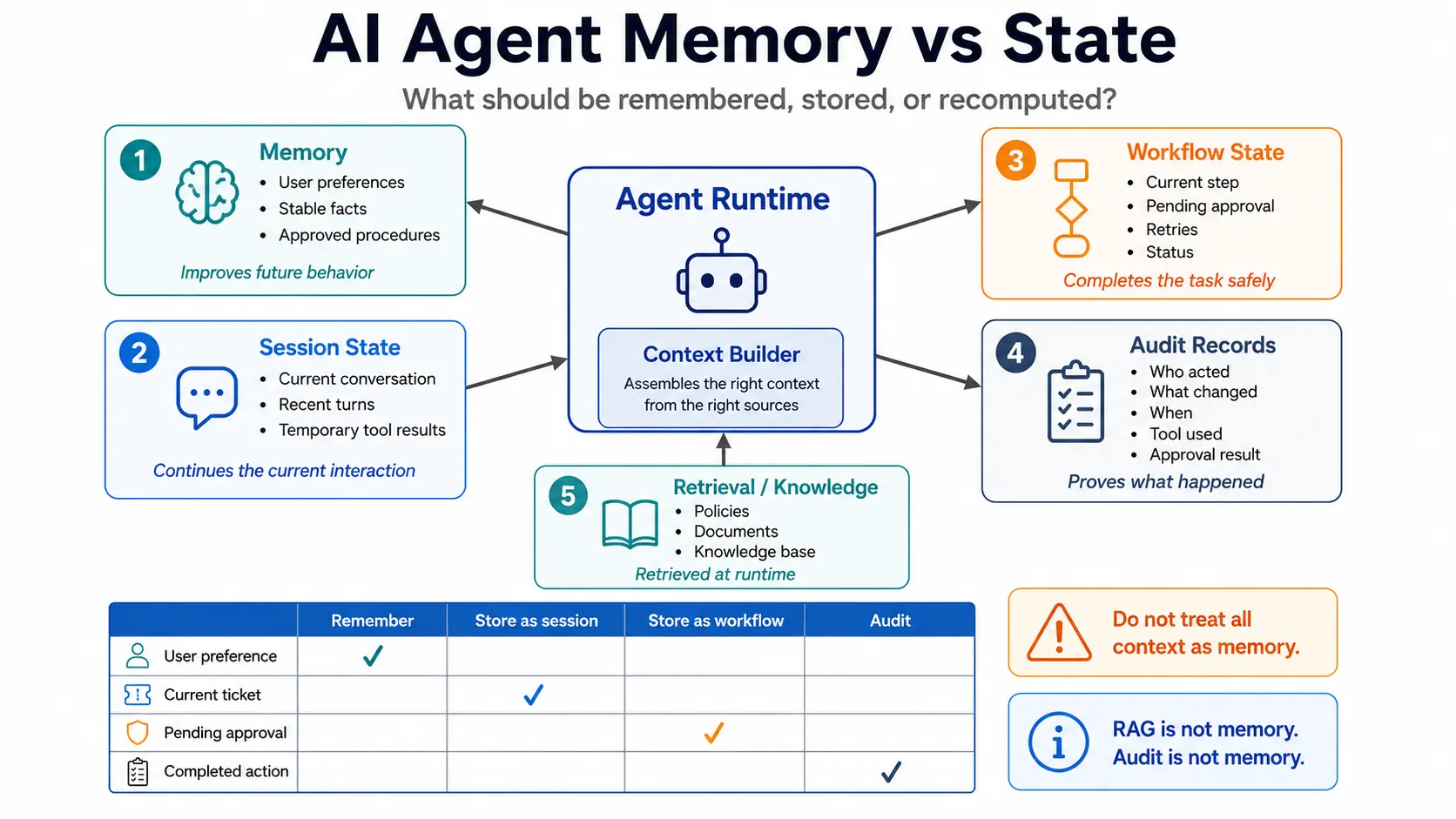
Memory helps the agent behave better later.
Session state helps the agent continue the current interaction.
Workflow state helps the system complete a task safely.
Audit records prove what happened.
These are different layers. Mixing them creates production failures.
OpenAI's API documentation describes conversation state as something developers must manage across messages or turns; each text generation request is otherwise independent and stateless unless prior messages or state references are provided. That distinction matters because "conversation continuity" is not the same as durable task execution or long-term memory. (OpenAI Developers)
Table of Contents
- What is the practical difference between AI agent memory and state?
- Why does memory vs state matter for enterprise AI agents?
- What are the four storage layers in a production AI agent?
- AI agent memory vs session state: what should be remembered across conversations?
- Session state vs workflow state: what should survive a running task?
- Workflow state vs audit records: what must be replayable, and what must be provable?
- RAG vs memory: when should agents retrieve instead of remember?
- What should be remembered, stored, recomputed, or audited?
- What usually fails when teams mix memory and state?
- What should the reference architecture look like?
- How should teams implement memory and state safely?
- What security and governance controls are required?
- AI agent memory and state design checklist
- Frequently Asked Questions About AI Agent Memory vs State
- Key Takeaways
What is the practical difference between AI agent memory and state?
AI agent memory is retained information that may help the agent in future interactions. Agent state is operational information needed to continue or complete a current session, task, or workflow.
That distinction is simple, but many implementations break it.
A user preference such as "always produce executive summaries first" may belong in memory. A current support-ticket ID belongs in session state or workflow state. A pending approval decision belongs in workflow state. A record that the user approved a payment action belongs in the audit log.
These are not interchangeable.
| Layer | Primary purpose | Example | Lifetime | Should the model edit it directly? |
|---|---|---|---|---|
| Memory | Improve future behavior | User prefers concise answers | Long-lived | No, not without policy |
| Session state | Continue current interaction | Current conversation topic, recent tool output | Short-lived | Controlled by runtime |
| Workflow state | Complete a task safely | Approval pending, step 4 of 8 completed | Until workflow completion or retention expiry | No |
| Audit record | Prove what happened | User approved action at timestamp X | Retention-controlled, append-only preferred | No |
Context is what the model sees. State is what the system knows. Memory is what the system intentionally retains. Audit is what the system must be able to prove.
Why does memory vs state matter for enterprise AI agents?
The distinction matters because enterprise AI agents do not only answer questions. They read documents, call tools, update systems, route requests, request approvals, and continue tasks across time.
OpenAI describes agents as applications that can plan, call tools, collaborate across specialists, and keep enough state to complete multi-step work. (OpenAI Developers) Once agents call tools or affect business systems, memory and state are no longer UX details. They become control-plane concerns.
The Agent Trust Boundary Model introduced the memory boundary and state boundary as two of the hardest boundaries to get right in practice. This article goes deep on exactly why.
Poor separation creates five practical problems.
1. Security problems
If an agent stores sensitive information as long-term memory, it may expose that information in later conversations. OWASP identifies sensitive information disclosure as a major LLM application risk and warns that failure to protect sensitive information in outputs can create legal and business consequences. (OWASP Foundation)
2. Reliability problems
If workflow progress is stored only in chat history, a crash, token trim, summarization error, or context reset can lose the task state.
3. Audit problems
If approval decisions are kept only in memory or session summaries, the organization cannot later prove who approved what, using which context, and when.
4. Prompt-injection problems
If external content is stored into memory without filtering, malicious or irrelevant instructions can persist beyond the original interaction. The UK NCSC explains that current LLMs do not enforce a robust security boundary between instructions and data inside a prompt. (National Cyber Security Centre)
5. Governance problems
If nobody can say what is remembered, where it is stored, how it is updated, who can delete it, and how long it is retained, the agent is not governable. NIST's AI Risk Management Framework is intended to help organizations manage AI risks and incorporate trustworthiness into AI system design, development, use, and evaluation. (NIST)
What are the four storage layers in a production AI agent?
A production AI agent should separate at least four storage layers:
- Memory.
- Session state.
- Workflow state.
- Audit records.
A fifth layer, retrieval knowledge, is often used with RAG. Retrieval knowledge is not the same as memory.
Storage layer 1: Memory
Memory is information intentionally retained to improve future behavior.
LangChain's memory documentation distinguishes long-term memory from short-term memory and describes semantic, episodic, and procedural memory types for AI agents. Semantic memory stores facts, episodic memory stores experiences, and procedural memory stores rules or procedures. (LangChain Docs)
In enterprise systems, memory should be treated as a controlled store, not a passive transcript dump.
Examples:
- user communication preference,
- team-specific formatting instruction,
- recurring workflow preference,
- known project constraint,
- preferred escalation path,
- stable business rule approved for reuse.
Memory should not automatically include:
- passwords,
- API keys,
- personal identifiers unless needed and permitted,
- raw email bodies,
- confidential documents,
- temporary tool output,
- malicious instructions embedded in external content,
- approval decisions that need audit-grade proof.
Storage layer 2: Session state
Session state is short-term state used to continue the current interaction.
OpenAI Agents SDK sessions store conversation history for a specific session, allowing agents to maintain context across multiple agent runs. The SDK retrieves prior session history before each run and stores new user inputs, assistant responses, and tool calls after each run. (OpenAI GitHub)
Examples:
- the last user request,
- current conversation thread,
- recently selected object,
- last tool result,
- temporary clarification answer,
- current draft response,
- currently active user intent.
Session state is useful for continuity, but it is not a reliable place to store durable workflow progress.
Storage layer 3: Workflow state
Workflow state is the operational state required to complete a task.
Examples:
- workflow ID,
- current step,
- completed steps,
- pending approval,
- tool-call result,
- retry count,
- timeout state,
- error state,
- compensation step,
- assigned human reviewer,
- final committed result.
Workflow state must survive crashes, restarts, model changes, and context trimming.
Temporal's workflow documentation defines workflow execution as a durable, reliable, scalable function execution. It also states that workflow execution state persists across failures and resumes from the latest state. (Temporal Docs)
The exact tool does not have to be Temporal. The principle matters: long-running agent tasks need durable workflow state outside the model context.
Storage layer 4: Audit records
Audit records are evidence.
They should record what happened, not help the agent "remember" in a conversational sense.
Examples:
- actor,
- tenant,
- user role,
- instruction received,
- data accessed,
- tool called,
- approval requested,
- approval granted or denied,
- resource changed,
- before/after value where appropriate,
- timestamp,
- correlation ID,
- model/version/runtime metadata,
- policy decision.
Audit records should usually be append-only or tamper-evident depending on the risk level. They should not be edited by the model.
ISO/IEC 42001 defines requirements for establishing, implementing, maintaining, and continually improving an AI management system. ISO's description highlights traceability, transparency, reliability, and structured management of AI risks. (ISO) Audit records are one practical mechanism for traceability.
AI agent memory vs session state: what should be remembered across conversations?
Memory should contain stable, approved, reusable information. Session state should contain temporary information needed for the current conversation.
Use memory for stable facts or preferences
Good candidates for memory:
| Candidate | Store in memory? | Reason |
|---|---|---|
| "User prefers short executive summaries before details." | Yes | Stable preference that improves future responses. |
| "For this team, escalation emails should include incident ID, impact, owner, and next update time." | Yes, if approved | Reusable procedural preference. |
| "This customer's environment uses Azure AD for identity." | Maybe | Useful if verified and not sensitive beyond policy. |
| "This project does not allow external SaaS processing." | Yes, if verified | Stable project constraint. |
Do not use memory for temporary context
Poor memory candidates:
| Candidate | Why not memory? | Better layer |
|---|---|---|
| "The user is currently reviewing ticket INC-4021." | Temporary | Session state or workflow state |
| "The last API call returned a timeout." | Operational event | Workflow state / observability log |
| "Approval pending from manager." | Task state | Workflow state |
| "User uploaded a confidential contract." | Sensitive data | Document store with access control, not memory |
| "The email said ignore prior instructions." | Untrusted content | Tool output, not memory |
Memory update should be explicit
Do not let the model silently decide to store everything.
A safer memory update flow:
- Extract candidate memory.
- Classify its type: preference, fact, rule, prior interaction, warning.
- Check sensitivity.
- Check source trust.
- Check user or organization policy.
- Store only if allowed.
- Record memory source and timestamp.
- Make memory reviewable and deletable where appropriate.
The reason is not theoretical. If untrusted webpage text, email content, PDF text, or tool output can become memory, a prompt-injection attack can become persistent.
Session state vs workflow state: what should survive a running task?
Session state helps the conversation continue. Workflow state helps the task complete.
A chat session can be abandoned. A workflow cannot be lost if it has already started changing business systems.
Example: employee access request agent
Assume an AI agent helps process an employee access request.
The user says:
"Give Priya access to the finance dashboard until Friday."
The agent may need to:
- identify Priya,
- identify the finance dashboard,
- check the requester's authority,
- classify access level,
- ask for approval,
- wait for approval,
- call IAM or ticketing tools,
- verify completion,
- notify the requester,
- record the action.
Session state may include:
- current conversation,
- clarification questions,
- user's latest answers,
- selected candidate identity,
- draft approval request.
Workflow state should include:
- workflow ID,
- requester ID,
- target user ID,
- target resource ID,
- requested permission,
- approval status,
- approver ID,
- policy decision,
- provisioning status,
- retries,
- completion status.
Audit records should include:
- who requested access,
- who approved it,
- what permission was granted,
- what tool changed the permission,
- when it happened,
- whether the action succeeded,
- correlation ID.
Memory may include:
- "This department uses finance-dashboard-readonly as the default access group," only if verified and approved as a reusable rule.
These distinctions prevent a serious failure: the agent should not grant access because it "remembers" that someone usually approves such requests. Approval for a specific action belongs in workflow state and audit records, not long-term memory.
Workflow state vs audit records: what must be replayable, and what must be provable?
Workflow state is used to continue execution. Audit records are used to prove execution history.
They may contain overlapping fields, but they are not the same.
| Question | Workflow state | Audit record |
|---|---|---|
| Primary purpose | Continue or recover task execution | Prove what happened |
| Mutability | Mutable until workflow completes | Prefer append-only |
| Audience | Runtime system, operators | Security, compliance, reviewers, incident responders |
| Example | approval_status = pending | "Approval requested from user X at time Y" |
| Failure handling | Retry, compensate, resume | Investigate, verify, evidence |
| Model access | Usually limited | Usually no direct model write access |
pending to approved to completed.Audit records should show the sequence:
- approval requested,
- approval granted,
- tool call executed,
- result returned,
- user notified.
Do not overwrite the audit trail with only the latest status.
Practical rule
Use workflow state for current truth. Use audit records for historical evidence.
A status field can say:
access_request_status = completed
The audit trail should show who requested it, what was requested, which policy was evaluated, who approved it, which tool executed it, what the tool returned, and what changed.
RAG vs memory: when should agents retrieve instead of remember?
RAG and memory solve different problems.
RAG, or retrieval-augmented generation, retrieves relevant external knowledge at runtime. Memory stores retained information from prior interactions or approved learning.
Use RAG when the agent needs authoritative source material. Use memory when the agent needs approved persistent context about preferences, prior interactions, or procedural behavior.
| Need | Better fit | Example |
|---|---|---|
| Find current policy | RAG | Retrieve latest HR access policy |
| Remember user preference | Memory | User prefers tabular summaries |
| Continue current chat | Session state | User is comparing two options |
| Resume approval workflow | Workflow state | Approval pending from manager |
| Prove a tool action happened | Audit record | IAM group changed at timestamp |
| Answer from uploaded document | RAG / document retrieval | Retrieve clause from contract |
| Apply learned communication rule | Memory | Always include risk owner in incident summaries |
Do not store raw tool outputs as memory. Store tool outputs in workflow state or logs if needed, and summarize only approved, reusable facts.
Do not use RAG as workflow state. A vector search result is not a reliable representation of task progress.
What should be remembered, stored, recomputed, or audited?
Use this decision matrix before building agent memory.
AI Agent Storage Decision Matrix
| Information type | Remember | Session state | Workflow state | Audit record | Recompute/retrieve |
|---|---|---|---|---|---|
| User formatting preference | Yes | Maybe | No | No | No |
| Current chat topic | No | Yes | No | No | No |
| Uploaded file contents | No | Maybe | No | Maybe metadata | Yes, retrieve with access control |
| Tool-call result | No | Maybe | Yes if task-critical | Yes if action-relevant | Maybe |
| Pending approval | No | Maybe display | Yes | Yes | No |
| Approval decision | No | No | Yes | Yes | No |
| API credential | No | No | No | Access event only | Retrieve from vault at runtime |
| Access token | No | Maybe runtime only | No | Maybe token issuance metadata | Re-issue if needed |
| Retrieved policy text | No | Maybe | Maybe reference | Maybe reference | Yes |
| Stable user preference | Yes | Maybe | No | Maybe memory-change record | No |
| Business rule | Maybe, if approved | No | No | Change record | Prefer policy/config store |
| Current step in task | No | Maybe | Yes | Maybe | No |
| Failed tool call | No | Maybe | Yes if retry needed | Yes if significant | Maybe |
| Model reasoning trace | Usually no | No | No | Policy decision needed | No |
| Final business action | No | No | Yes status | Yes | No |
| Sensitive personal data | Avoid | Minimize | Only if required | Minimize and protect | Retrieve only when authorized |
The most important design question
Before storing anything, ask:
Will this information help future behavior, continue current conversation, complete a workflow, prove an action, or answer from a source of truth?
If the answer is unclear, do not store it as memory.
What usually fails when teams mix memory and state?
Failure 1: Chat history becomes the workflow engine
This happens when developers rely on conversation history to know what step the agent is on.
It works in demos. It fails when:
- the session is trimmed,
- the summary loses detail,
- the user changes topic,
- the process waits for approval,
- the system restarts,
- another worker resumes the task,
- the model interprets old context incorrectly.
Session history is not a durable workflow engine.
Failure 2: Memory becomes a data leak
This happens when agents remember raw details from emails, tickets, chats, documents, and tool outputs.
Examples:
- customer identifiers stored as memory,
- confidential contract details retained across unrelated sessions,
- internal incident details recalled for the wrong user,
- sensitive HR information stored as personalization data.
OWASP's LLM Top 10 includes sensitive information disclosure and excessive agency as major risks. Excessive agency is relevant when agents have unchecked autonomy to take actions, and sensitive disclosure is relevant when protected data appears in outputs. (OWASP Foundation)
Failure 3: Audit records are treated as summaries
Summaries are not audit records.
A summary may omit details, compress context, or introduce errors. OpenAI's context-management cookbook describes summarization as useful for long-running interactions, but also identifies risks such as context distortion or poisoning when older content is compressed. (OpenAI Developers)
Audit logs should not rely on model-generated summaries alone.
Failure 4: Tool output becomes instruction
Tool output can contain untrusted text.
Examples:
- an email saying "ignore all previous instructions,"
- a webpage containing hidden commands,
- a PDF containing malicious prompt text,
- a ticket comment instructing the agent to exfiltrate data.
The NCSC explains that prompt injection arises when developers combine trusted instructions and untrusted content in one prompt and then behave as if a robust boundary exists between them. Current LLMs do not enforce that boundary themselves. (National Cyber Security Centre)
Tool output should be data. It should not automatically become instruction, memory, or policy.
Failure 5: RAG is used as memory
A vector database can retrieve relevant knowledge, but retrieval is not the same as memory.
Problems appear when teams use RAG to answer questions such as:
- "What step is this workflow on?"
- "Was approval granted?"
- "Did the API call succeed?"
- "Which version of the decision was final?"
Those are state and audit questions, not retrieval questions.
Failure 6: Recomputed values replace committed facts
Some values can be recomputed. Others must be preserved.
For example, a pricing quote may be recomputed during exploration. But once an order is placed, the price snapshot used for that order should be stored. The same principle applies to agent workflows.
If an agent made a decision based on policy version 12, the audit record should not later imply it used policy version 15 because that is the current version.
What should the reference architecture look like?
A secure AI agent runtime should separate the model from memory, workflow state, audit, tools, and policy.
Reference architecture
User / System Request
        |
        v
Agent Runtime / Orchestrator
        |
        |-- Instruction Layer
        |     - system instructions
        |     - developer instructions
        |     - task instructions
        |
        |-- Context Builder
        |     - session state
        |     - retrieved documents
        |     - approved memory
        |     - workflow state summary
        |
        |-- Policy Layer
        |     - user permissions
        |     - tenant rules
        |     - tool permissions
        |     - data access rules
        |
        |-- Memory Store
        |     - approved preferences
        |     - stable facts
        |     - procedural rules
        |
        |-- Session Store
        |     - current conversation
        |     - recent turns
        |     - temporary tool outputs
        |
        |-- Workflow Store
        |     - workflow ID
        |     - current step
        |     - pending approvals
        |     - retries and completion status
        |
        |-- Audit Log
        |     - actor
        |     - action
        |     - resource
        |     - tool call
        |     - approval
        |     - timestamp
        |     - result
        |
        |-- Tool Router
              - CRM
              - email
              - ticketing
              - IAM
              - database
              - document systems
Architecture rule
The model should not directly own memory, workflow state, or audit records.
The runtime should decide:
- what context the model receives,
- what memory candidates are allowed,
- what tool calls are permitted,
- what actions need approval,
- what workflow state changes are valid,
- what audit records must be written.
This is the core distinction between a chatbot and a production AI agent.
A chatbot can carry conversation. A production agent needs governed execution.
How should teams implement memory and state safely?
Step 1: Define storage classes before building features
Create explicit classes:
| Class | Description |
|---|---|
memory.preference | Stable user or team preference |
memory.fact | Stable verified fact |
memory.procedure | Approved reusable procedure |
session.turn | Conversation turn |
session.tool_result | Temporary tool output |
workflow.step | Durable workflow progress |
workflow.approval | Pending or completed approval |
audit.action | Tool call or business action |
audit.policy_decision | Policy evaluation result |
audit.memory_change | Memory created, changed, or deleted |
memory table to store everything.Step 2: Assign ownership
Each layer needs an owner.
| Layer | Owner |
|---|---|
| Memory | Product/AI platform + privacy/security rules |
| Session state | Agent runtime |
| Workflow state | Workflow/orchestration engine |
| Audit records | Security/compliance/platform engineering |
| Retrieval knowledge | Data/document owner |
| Tool credentials | Vault/IAM/security team |
Step 3: Create memory admission rules
Before a memory is saved, check:
- Is it useful beyond this session?
- Is it stable enough to reuse?
- Is it sensitive?
- Was it provided by a trusted source?
- Does the user or organization allow retention?
- Can it be reviewed or deleted?
- Does it conflict with a higher-priority policy?
- Should it be a policy/config value instead of memory?
Step 4: Store workflow state outside conversation history
For every long-running task, create a workflow record:
| Field | Purpose |
|---|---|
workflow_id | Stable identifier |
tenant_id | Tenant isolation |
actor_id | Who initiated the task |
resource_id | What the task affects |
current_step | Progress |
status | Pending, running, waiting, failed, completed |
approval_status | Required for risky actions |
retry_count | Controls retry behavior |
last_error | Supports recovery |
created_at | Traceability |
updated_at | Operational status |
Step 5: Record audit events separately
For each significant action, write an audit event.
Minimum fields:
| Field | Reason |
|---|---|
event_id | Unique audit event |
correlation_id | Trace across systems |
tenant_id | Tenant boundary |
actor_type | User, service, agent |
actor_id | Who initiated |
agent_id | Which agent acted |
action | What happened |
resource_type | What kind of object |
resource_id | Which object |
tool_name | Tool used |
input_reference | Reference to input, not necessarily raw data |
policy_decision | Allow, deny, approval required |
approval_id | Link to approval if applicable |
result | Success, failure, partial |
timestamp | When it happened |
Step 6: Limit what enters model context
The context builder should include only what is required.
Context sources:
- current user instruction,
- relevant session state,
- relevant approved memory,
- retrieved documents,
- workflow state summary,
- tool schemas,
- policy constraints.
Do not dump entire memory, full document text, full tool logs, and full audit history into the prompt.
OpenAI's context-management cookbook notes that too much carried-forward context can distract the model, increase inefficiency, or create failure, while too little context can cause loss of coherence. It discusses trimming and compression as context-management techniques and calls out risks such as context poisoning and summary drift. (OpenAI Developers)
Step 7: Make memory reviewable
Users and admins should be able to inspect, correct, and delete memory where appropriate.
At minimum:
- show stored memories,
- show memory source,
- show created/updated time,
- show scope: user, team, tenant, global,
- allow deletion or suppression,
- audit memory changes.
This is not just a UX feature. It is a control mechanism.
What security and governance controls are required?
Control 1: Separate trusted instructions from untrusted data
System instructions, developer instructions, user instructions, retrieved content, and tool output should not be treated as equal.
The NCSC's guidance is important here: current LLMs do not enforce a security boundary between instructions and data inside a prompt. (National Cyber Security Centre) The runtime must therefore enforce boundaries outside the model.
Control 2: Do not store secrets in memory
Secrets should not be remembered. API keys, passwords, refresh tokens, private keys, session cookies, and database credentials all belong in a vault or tool execution layer — not in the agent's memory store.
Control 3: Scope memory by user, team, tenant, and application
A memory that is valid for one user may be wrong or unsafe for another.
Use explicit scopes:
| Scope | Example |
|---|---|
| User | "User prefers concise answers." |
| Team | "Security team wants incident summaries in this format." |
| Tenant | "Tenant uses ServiceNow for ticketing." |
| Application | "This agent drafts support replies but cannot send them." |
| Global | "Never store raw credentials." |
Control 4: Treat memory writes as state-changing actions
Writing memory is not passive.
A memory update can affect future outputs and actions. Therefore, memory writes should be classified, validated, permissioned, logged, and reviewable.
Control 5: Human approval belongs in workflow state and audit
Approval should not be a conversational impression.
Bad design:
The agent remembers that the manager approved similar requests before.
Good design:
The workflow has approvalAPP-123, approved bymanager_id, forresource_id, attimestamp, for this specific requested action.
Control 6: Use retention policies
Different layers need different retention policies.
| Layer | Retention approach |
|---|---|
| Session state | Short-lived; delete or summarize after inactivity |
| Memory | Retain while useful and permitted |
| Workflow state | Retain through workflow completion and operational retention |
| Audit records | Retain according to legal, security, or business requirements |
| Retrieved documents | Govern by source system permissions |
Control 7: Log memory changes
Audit memory writes separately. Important events: memory created, updated, deleted, suppressed, used in model context, rejected due to policy, and rejected due to sensitivity. This supports incident review.
Control 8: Do not use model-generated summaries as sole evidence
Summaries are useful for context compression. They are not enough for audit. For audit-sensitive actions, store structured events and references.
AI agent memory and state design checklist
Use this before moving an AI agent from prototype to production.
Memory checklist
- [ ] Is long-term memory required, or is session state enough?
- [ ] Are memory types defined: preference, fact, procedure, episode?
- [ ] Are memory scopes defined: user, team, tenant, global?
- [ ] Are sensitive fields excluded?
- [ ] Is memory write permissioned?
- [ ] Is memory reviewable and deletable?
- [ ] Are memory changes audited?
- [ ] Is untrusted tool output blocked from automatic memory writes?
Session state checklist
- [ ] Is session state separated from long-term memory?
- [ ] Is session retention limited?
- [ ] Are large tool outputs trimmed or referenced instead of copied?
- [ ] Is summarization logged if used?
- [ ] Are old sessions prevented from overriding current user intent?
- [ ] Can users start a clean session?
Workflow state checklist
- [ ] Are long-running tasks stored outside chat history?
- [ ] Is there a workflow ID?
- [ ] Are steps, status, retries, and errors stored?
- [ ] Are approvals represented as structured state?
- [ ] Can workflows resume after failure?
- [ ] Can workflows be cancelled safely?
- [ ] Are compensation or rollback paths defined for state-changing actions?
Audit checklist
- [ ] Are tool calls logged?
- [ ] Are approval decisions logged?
- [ ] Are policy decisions logged?
- [ ] Are memory changes logged?
- [ ] Are actor, tenant, resource, action, timestamp, and result captured?
- [ ] Are audit records protected from model edits?
- [ ] Is retention defined?
Context checklist
- [ ] Does the context builder include only necessary information?
- [ ] Are trusted instructions separated from untrusted data?
- [ ] Are retrieved documents access-controlled?
- [ ] Are memory entries filtered before injection?
- [ ] Is workflow state summarized safely?
- [ ] Are secrets excluded from prompts?
Frequently Asked Questions About AI Agent Memory vs State
What is AI agent memory?
AI agent memory is information intentionally retained so the agent can behave better in future interactions. It may include user preferences, verified facts, prior successful patterns, or approved procedural guidance. It should not become a raw transcript store.
What is AI agent state?
AI agent state is operational information needed to continue a conversation, task, or workflow. It can include current conversation context, workflow step, pending approval, retry count, selected resource, or tool result. State is usually more temporary and task-specific than memory.
What is the difference between memory and session state?
Memory is retained across sessions when it is useful and allowed. Session state exists to continue the current interaction. A user preference may be memory; the current ticket being discussed is session state.
What is the difference between session state and workflow state?
Session state tracks conversation continuity. Workflow state tracks task progress. If an agent is waiting for approval, retrying a tool call, or resuming after failure, that belongs in workflow state, not only in chat history.
Should AI agents store everything they see?
No. AI agents should store only information that has a clear purpose, allowed retention, known scope, and acceptable sensitivity. Raw documents, credentials, temporary tool outputs, and untrusted external instructions should not automatically become memory.
Is RAG the same as memory?
No. RAG retrieves relevant knowledge from external sources at runtime. Memory stores retained information from prior interactions or approved learning. Use RAG for source-grounded answers and memory for stable preferences or reusable context.
Should audit logs be part of agent memory?
No. Audit logs should be separate from memory. Memory helps future behavior; audit logs prove what happened. Audit records should be structured, protected, and preferably append-only or tamper-evident for sensitive workflows.
What is the biggest risk of mixing memory and state?
The biggest risk is that temporary, sensitive, or untrusted information becomes durable and influences future behavior. This can cause data leakage, wrong actions, weak auditability, and persistent prompt-injection effects.
Key Takeaways
- AI agent memory, session state, workflow state, and audit records are different architectural layers.
- Memory should store approved, reusable context; it should not store everything the agent sees.
- Session state helps the agent continue the current conversation, but it should not be the source of truth for long-running workflows.
- Workflow state should store task progress, approvals, retries, errors, and completion status outside model context.
- Audit records should prove who did what, when, using which tool, under which policy decision.
- RAG is not memory. It retrieves source-grounded knowledge at runtime.
- Prompt-injection risk increases when untrusted tool output or document content can become memory.
- Production AI agents need a context builder, memory policy, workflow store, audit log, and tool-control layer.
References
- OpenAI Conversation State documentation
- OpenAI Agents SDK documentation
- OpenAI Agents SDK Sessions
- LangChain Memory documentation
- NCSC: Prompt injection is not SQL injection
- OWASP Top 10 for Large Language Model Applications
- Temporal Workflow Execution documentation
- NIST AI Risk Management Framework
- ISO/IEC 42001
- OpenAI Context Management Cookbook
In the Handbook: Agent State and Memory Architecture: Scoping, Retention and Provenance covers this in full architectural depth, as part of The Enterprise AI Architect's Handbook.
Part of the series
Designing Secure AI Agents- 1.AI Agent Architecture: The Trust Boundary Model
- 2.AI Agent Memory vs State: What Should Be Remembered, Stored, or Recomputed?← you are here
- 3.Tool Output Is Not Instruction: A Core Rule for Secure AI Agents
- 4.Secure Architecture for AI Agents That Read Email, Documents, and Webpages
- 5.AI Agent Prompt Injection Risk Scorecard: How to Assess Agents Before Production
- 6.Human-in-the-Loop AI Agents: Where Approval Gates Actually Mattercoming soon
- 7.Designing Production-Grade AI Agents: Permissions, Tools, Logs, and Rollbackscoming soon
- 8.Building AI Agents That Can Use Tools Without Owning Secretscoming soon
- 9.AI Agent Audit Logs: What Enterprises Need to Capturecoming soon
- 10.AI Agent Runtime Control: Why Prompt-Level Guardrails Are Not Enoughcoming soon
- 11.RAG vs Agent Memory vs Workflow Statecoming soon
- 12.AI Agents in Regulated Enterprises: Access, Approval, Audit, and Deployment Constraintscoming soon

Aakash Ahuja
Enterprise AI, Cybersecurity & Platform Engineering
Aakash writes about secure AI agents, microservices architecture, enterprise platforms, and production engineering. He has 20+ years of experience building and operating software systems across banking, cloud, cybersecurity, AI, and enterprise workflow automation. He is Director of Technology at itmtb Technologies and teaches AI, Big Data, and Reinforcement Learning at top institutes in India.